I am seeing more and more organic listings with the eye-catchy yellow star ratings (reviews) on Google, and to be honest I am kinda feeling jealous as I have not yet scored one myself. Moz tracks 10,000 keywords across different industries and they have seen these appearing on 35.1% of the queries. That’s a huge number and definitely something I believe SEOs should invest in for their clients.
Search for galaxy s3 and see how these star rated listings look.
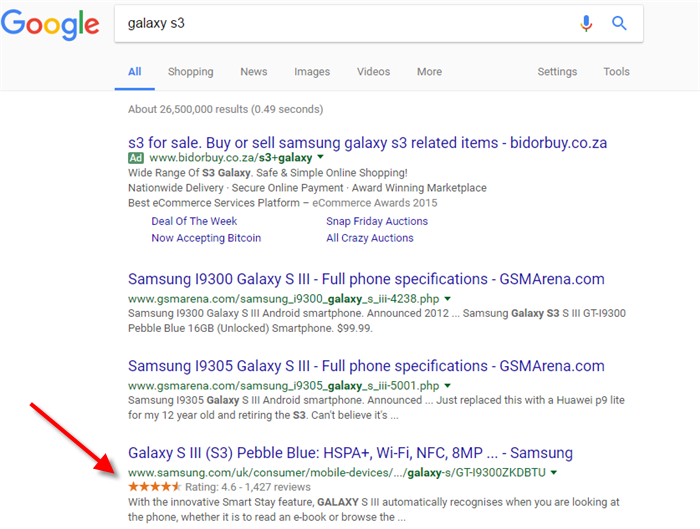
If you do a product related search for example”antivirus” you can see a few sites (mostly in the AdWords) that display the yellow stars. Please note that star ratings are visible in both paid and organic listings, however in this post I will be covering those in the natural (free) listing only. You can also spot these for game related queries for example search for Pokémon Red and you can see starts on LoveRoms.com and eBay.

As mentioned I don’t have any of these stars on sites that I manage, but I suspect they are big Click-through rate (CTR) boosters. Both their shape (stars) and colour (yellow) grab user attention and I know having these on your site will bring tonnes of traffic, (not to mention much needed revenue). They also add that “trust” factor among googlers, which helps ease purchase anxieties as well.
So how do you get these star reviews?
Long answer – Schema!
Schema is an essential part of optimizing websites for local search, as takes messy data and displays beautiful rich snippets. There is comprehensive documentation at schema.org, with script examples. For ratings you can use JSSON-LD. JSON-LD is a markup data-linking format that allows for easy embedding of data in a script tag. The code is easily understood by Google and can be used to by businesses to display typical NAP, opening hours, corporate-ID and other structured data such as geo-location information and reviews.
Here is code to add aggregate ratings
<script type="application/ld+json">
            {
            "@context": "http://schema.org",
            "@type": "ProfessionalService",
            "name": "Hilton Johani",
         "aggregateRating": {
         "@type": "AggregateRating",
         "ratingValue": "4",
         "reviewCount": "2"
              },
         "review": [
          {
             "@type": "Review",
             "author": "Jacob",
             "datePublished": "2017-01-01",
             "description": "Love the atmosphere and vibe. I will be recommnding all my friends to spend some                                    time with this interesting fellow. Looking forward to seeing my conversions going up",
             "name": "Excellent service, professional",
             "reviewRating": {
             "@type": "Rating",
             "bestRating": "5",
             "ratingValue": "3",
              "worstRating": "1"
                      }
                    },
         {
             "@type": "Review",
             "author": "Thuli",
             "datePublished": "2017-01-02",
             "description": "Excellent service and well structured class. learnt a lot today",
             "name": "Affordable lessons",
             "reviewRating": {
             "@type": "Rating",
             "bestRating": "5",
             "ratingValue": "5",
             "worstRating": "1"
                   }
               }
            ]
      }
</script>
Once you have your code ready head over to the Structured Data testing tool and paste it in the script space. Click on Validate and you will see something similar to what I have below. Fix your errors and warnings then test again.

It takes time for the stars to start appearing in Google so you need to be patient. I will be adding these to my site and will post a update on progress.